
My domain is still pending verification
A domain stays Waiting for DNS until your provider sees every record. Open View records, fix the rows that say Not found yet, then click Check my records.
On this page
Your domain shows Waiting for DNS until your email provider can see every DNS record Meisa gave you. Open the domain’s records, find the rows marked Not found yet, fix them at your DNS host, and click Check my records. Most domains verify within an hour of the records going live.
Check which records are missing
- Click Email setup in the sidebar.
- Find your domain and click View records. A panel opens with every record and its status.
- Look at the Status column:
- Found: this record is live.
- Not found yet: your DNS host does not show it yet, or it is wrong.
- Failed: the record exists but does not match.
- Fix the rows that are not Found (see the common causes below).
- Click Check my records.
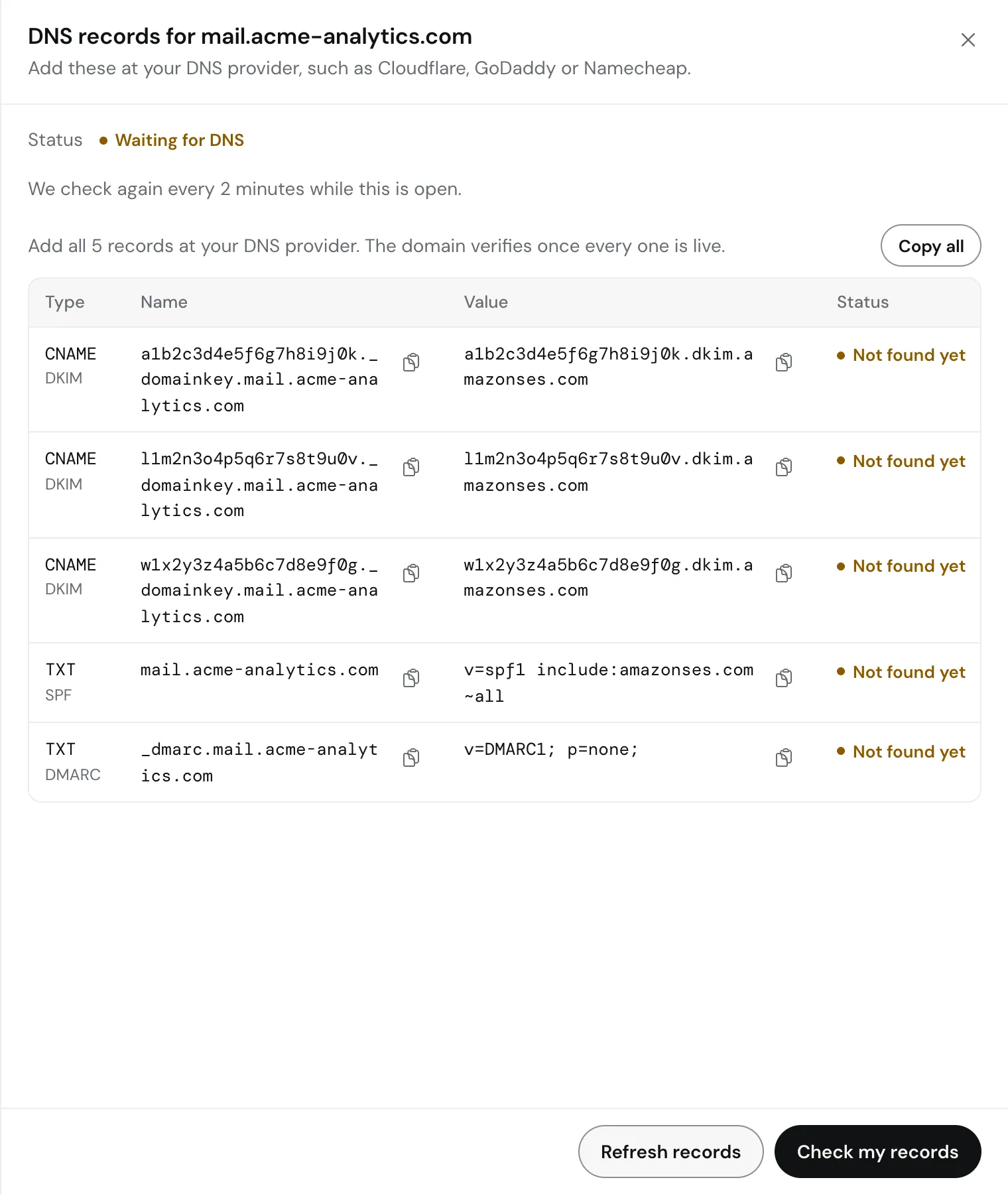 While the panel is open, Meisa checks again every 2 minutes and tells you as soon as the domain is verified. You can close it and come back later.
If the check returns a message from your provider, it appears above the table as “Couldn’t verify yourdomain.com” with the reason. If it says “Not visible yet”, your records have not reached the internet yet. DNS changes can take up to an hour, sometimes longer.
Common causes
The domain name was added twice. Many DNS hosts add your domain to the end of the name automatically. If you paste abc._domainkey.yourdomain.com into the Name field, the real record becomes abc._domainkey.yourdomain.com.yourdomain.com. Enter only the part before your domain, such as abc._domainkey. For the SPF record, Meisa shows @, which means the domain itself.
Cloudflare proxy is on. In Cloudflare, the DKIM CNAME records must be DNS only (grey cloud), not Proxied (orange cloud). A proxied CNAME is invisible to email providers.
A DKIM record is missing. Amazon SES needs all three DKIM CNAME records. Use Copy all in the panel so none get left out.
Two SPF records. A domain can only have one SPF record. If you already have one, add include:amazonses.com to it instead of creating a second.
Wrong DNS host. Records only work where your domain’s nameservers point. If you moved DNS to Cloudflare, adding records at your registrar does nothing. Check which nameservers your domain uses at your registrar.
Typo in the value. Copy each value with the copy button instead of typing it.
Step-by-step help for each DNS host: Add Meisa’s DNS records at Cloudflare, GoDaddy, Namecheap or Route 53.
Amazon SES: check the status in AWS
- Sign in to the AWS console and open Amazon SES.
- Make sure the region at the top right matches the region of your SES provider in Meisa.
- In the left menu, under Configuration, click Identities.
- Click your domain. The Identity status and the DomainKeys Identified Mail (DKIM) status show what AWS sees.
If the domain is not listed at all, it was added in a different region, or it was deleted in AWS. In Meisa, open View records and click Refresh records to ask AWS again.
If AWS shows Failed, it stopped trying. SES only keeps checking for 72 hours. Fix the records, then click Refresh records in Meisa to start verification again, and then Check my records. If the record values change after the refresh, update them at your DNS host.
Still pending after 24 hours?
- Check the records yourself with a public lookup tool, such as
digor an online DNS checker, for each name in the table. - Compare the value character by character with Meisa’s table.
- If everything matches and Meisa still says Waiting for DNS, write to [email protected] with your domain name. We will check it with you.
Can I send while it is pending?
No. Meisa refuses to send from an address on a domain that is not verified, and your sending health score shows the domain as a problem until it passes.
Related articles
Did this answer your question?
Thanks for letting us know.Thanks, we will improve this article. Want a hand right now?
Still need help?
Chat with us and get an answer in a few minutes.