
Set up open and click tracking
Meisa tracks opens and clicks itself with no setup. Run Set up delivery tracking once so SES reports deliveries, bounces and complaints back to Meisa.
On this page
Opens and clicks need no setup: Meisa adds an open pixel and tracked links to your emails itself, and you can switch them off per broadcast or sequence. What you do need to set up once is delivery tracking: in Email setup, open your SES provider’s More actions menu, click Set up delivery tracking, then Set up tracking. After that, SES reports deliveries, bounces and spam complaints back to Meisa.
Turn on delivery tracking (Amazon SES)
Do this after you finish the three setup steps (provider, domain, sender), when Email setup shows your providers, senders and domains.
- Click Email setup in the sidebar.
- In the Sending provider section, click the More actions menu (three dots) on your Amazon SES provider.
- Click Set up delivery tracking.
- Read the dialog and click Set up tracking.
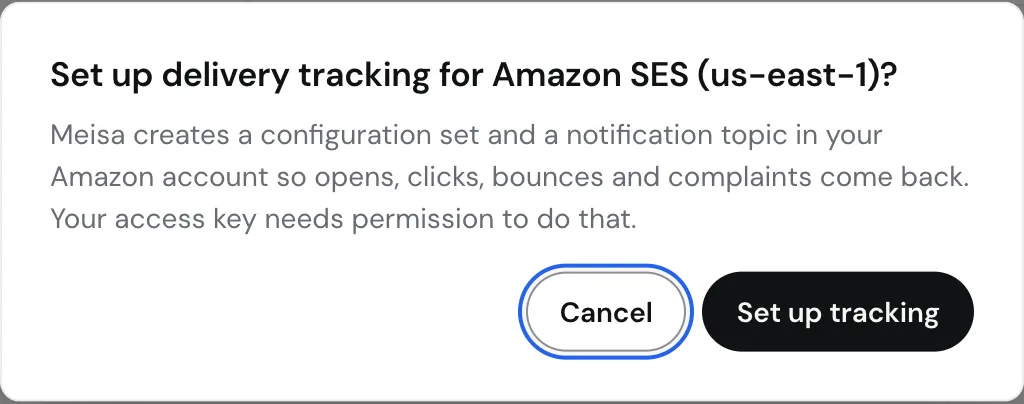 When it works, you see “Delivery tracking is set up. Configuration set: meisa-tracking-…” It takes a few seconds.
What Meisa creates in your AWS account
In the region you connected, Meisa creates:
- An SNS topic named
meisa-events-...and subscribes Meisa’s webhook to it. Meisa confirms the subscription automatically. - An SES configuration set named
meisa-tracking-.... - An event destination on that configuration set that sends send, delivery, bounce, complaint and reject events to the SNS topic.
Meisa then saves the configuration set name on your provider and sends every email through it. You can see them in the AWS console under SES, Configuration sets, and under SNS, Topics.
Opens and clicks are deliberately not part of the SES event destination, because Meisa records them itself. Turning them on in SES would count every open and click twice.
What you get
- Hard bounces are added to your suppression list, so Meisa never emails that address again.
- Spam complaints unsubscribe the contact right away.
- Deliveries are recorded, so you can tell delivered emails from ones still in flight.
- AWS sees bounces and complaints being handled, which protects your SES account. Mention it in your production access request.
Without delivery tracking, bounces and complaints still count against your SES account, but Meisa cannot see them or stop emailing those addresses.
Open and click tracking
Meisa adds a tiny open pixel and rewrites links so it can count opens and clicks. Both are on by default. To change them:
- Broadcasts: in the broadcast composer, under When it goes, find Tracking and use the Track link clicks and Track opens switches.
- Sequences: in the sequence builder, click Settings to open Sequence settings, and use the same two switches.
Turning them off sends links straight to your site and adds no pixel. That can help inbox placement, but no click or open stats are recorded for that send. If Meisa has paused tracking for all emails, a note under the switches says until when, and your choices apply after that.
Open counts are never exact: Apple Mail Privacy Protection and security scanners open emails automatically. Meisa separates these out. See Read your results: real opens vs raw opens, clicks and bounces.
Troubleshooting
- “AccessDenied” or “The IAM user/role needs these permissions”: add
sns:CreateTopic,sns:Subscribe,ses:CreateConfigurationSetandses:CreateConfigurationSetEventDestinationto your IAM policy, then try again. See Create an AWS IAM user and access keys for Meisa. - Running it twice: it is safe. Meisa reuses the topic and configuration set that already exist.
- You changed AWS region: run Set up delivery tracking again so the configuration set exists in the new region.
- Use Meisa’s configuration set, not your own. Leave the Configuration set field on the provider empty and let Meisa create it. Meisa only accepts events from the SNS topic it created, so a configuration set you build by hand will not report bounces to Meisa.
- Using Mailgun or SendGrid? The same Set up delivery tracking menu item sets up their webhooks. With Mailgun, your Mailgun dashboard shows zero opens and clicks by design, because Meisa tracks them.
Related articles
Did this answer your question?
Thanks for letting us know.Thanks, we will improve this article. Want a hand right now?
Still need help?
Chat with us and get an answer in a few minutes.