
Send transactional emails with triggers
Create a transactional email in Meisa with a key like user_signed_up, then send it from your app with one API call to /emails/trigger/.
On this page
A transactional email is one email your app sends with an API call, like a welcome email, a receipt or a password reset. You set it up once in Meisa under Transactional emails with a key such as user_signed_up, then your app calls POST /emails/trigger/ with that key and the recipient.
Your team owns the design and wording in Meisa. Your code only sends the key and the values.
Before you start
- A connected email provider and a verified sending domain.
- A template for the email. See Build an email template.
- An API key with the Send transactional emails permission. See Create and manage API keys.
Set up the email in Meisa
- In the sidebar, click Transactional emails.
- Click New transactional email.
- Under Basics, fill in:
- Name, for example “New signup welcome”.
- Key: the name your code uses, for example
user_signed_up. Use lowercase letters, numbers and underscores. - Description (optional).
- Under Email, pick the Template and the Sender (or keep Product default sender). Leave Subject (optional) empty to use the template’s subject.
- Check What your app sends. Meisa lists the values your template uses, like
first_nameorreset_link, so you know what to pass. - Click Create transactional email and make sure the switch is On.
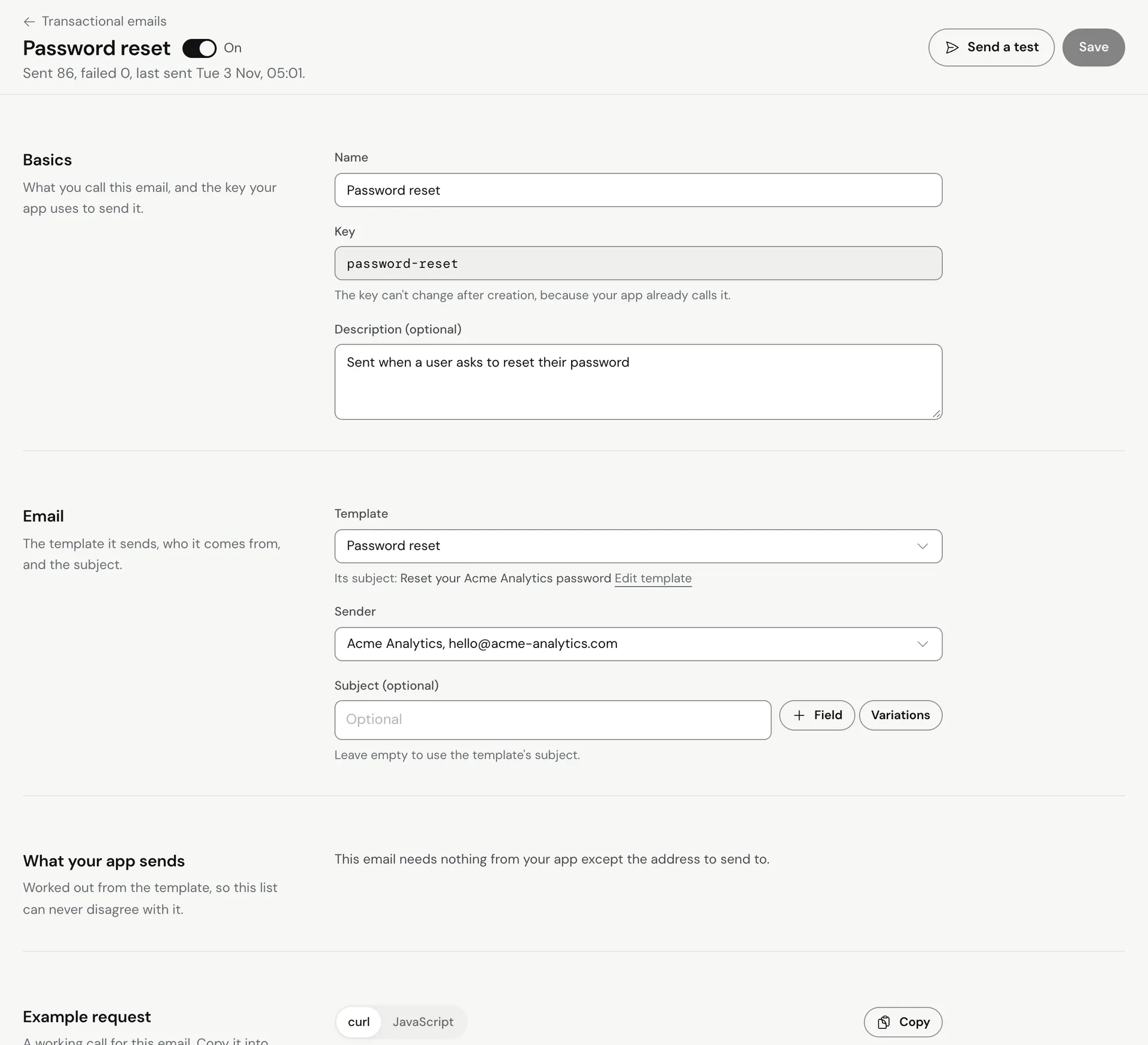 The Example request section shows a ready-made
curl and JavaScript call for this email.
Send it from your app
curl -X POST "https://api.meisa.io/api/v1/emails/trigger/" \
  -H "X-API-Key: meisa_live_your_key" \
  -H "Content-Type: application/json" \
  -d '{
    "trigger_key": "user_signed_up",
    "to_email": "[email protected]",
    "variables": { "first_name": "Maya", "dashboard_url": "https://app.example.com" },
    "idempotency_key": "signup-12345"
  }'
trigger_keyandto_emailare required.variablesfill the{{first_name}}style placeholders in the template. Values are HTML-escaped. To insert raw HTML, use triple braces{{{receipt_table}}}in the template, or end the variable name with_html.idempotency_keyis optional but recommended. If your app retries with the same key within an hour, Meisa doesn’t send a second copy.
If the person isn’t a contact yet, Meisa creates them.
Responses
| Status | Meaning |
|---|---|
200 with "status": "sent" |
Sent. The response includes email_send_id and contact_id. |
200 with "status": "skipped" |
Not sent on purpose. The reason says why, for example conditions_not_met, a bounced or invalid address, the person opted out of this type of email, or the frequency cap. Don’t retry these. |
202 with "status": "scheduled" |
The email has a delay set, so it goes out when the delay ends. |
400 |
Missing or invalid fields, for example an unknown trigger_key or a turned-off email. |
402 |
Your Meisa account has no active trial or plan, or it hit a free trial limit. |
403 |
Your API key doesn’t have the Send transactional emails permission. |
422 |
Can’t send to this person (for example unsubscribed), or the sender isn’t set up or verified. |
429 |
A safety limit blocked the send (the same email to the same person within an hour, or more than 10 emails to one person in a day), or you hit the API rate limit. |
Advanced options
Click Show advanced options in the editor:
- Email type: the category people can opt out of, such as Offers and promotions. Leave it on Automatic if you are not sure. When you tick Send even if the person unsubscribed, it shows Transactional (always sends).
- Send even if the person unsubscribed: use only for emails the person must get, like a receipt or a password reset.
- Allow the same email twice within an hour: by default Meisa blocks a repeat of the same email to the same person within 60 minutes.
- Skip the limit of 10 emails per person a day.
Test it
From the list, open the row’s menu and click Send a test. Fill in Values your app would send, pick from Saved test addresses or Add an address (optional), and send.
Send a one-off email without a template
For emails your app builds itself, use POST /emails/send/ with to_email, subject, and html or text. It uses your product’s default sender unless you pass from_email and from_name, and it can carry up to 5 small attachments (2 MB in total). By default it sends even to unsubscribed addresses, so pass "respect_suppression": true for anything that isn’t strictly transactional.
Troubleshooting
- 400 trigger not found: the key in your code doesn’t match the Key in Meisa, or the email is switched off.
- 422: the person is unsubscribed or bounced, or no sender is set up. See Why was my email not sent?
- Placeholders show as blank: the variable names in your call must match the template exactly.
Related articles
Did this answer your question?
Thanks for letting us know.Thanks, we will improve this article. Want a hand right now?
Still need help?
Chat with us and get an answer in a few minutes.